Quilt Creator
Crochet DesignsArt & Design
1.481.00 Reviews
- Version
- 26.2.3
- Installs
- 10.00K
- Age Rating
- Everyone
Screenshots
Our Review of Quilt Creator
 Analysis by Appyee
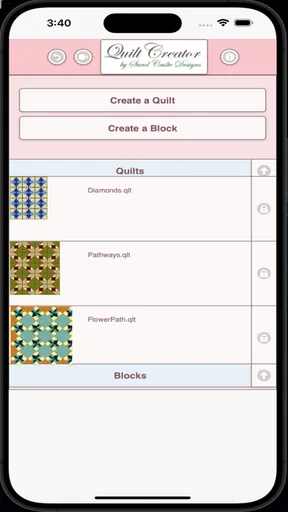
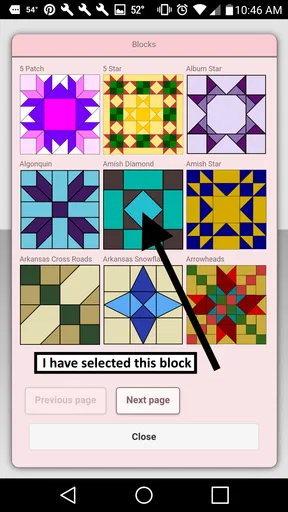
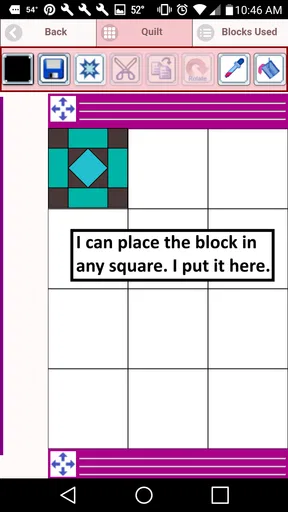
I approached Quilt Creator as a practical design companion rather than a complete quilting course. It is a free Art & Design app from Crochet Designs, built around choosing quilt blocks and arranging ideas on a phone. The central attraction is clear from the first session: there are more than two hundred blocks to browse, so opening it can feel like sitting down with a small visual reference shelf when I want inspiration quickly.
That immediate variety is also the app’s strongest argument. I can imagine using it while planning a weekend project, checking whether a block combination feels balanced, or showing a family member a rough direction before buying fabric. At the same time, its very low average rating of 1.4 from around 160 ratings is an important warning for anyone expecting a polished, dependable design studio. My experience with the concept is more positive than that number suggests, but I would not treat the app as an essential tool without first deciding whether its narrow purpose matches my habits.
What the first week feels like
The first few sessions are driven by discovery. A large block library gives the app a browsing quality that paper references do not always offer: I can move from one visual idea to another without spreading several books across a table. That makes it useful when I have a vague goal, such as a geometric quilt, a traditional-looking arrangement, or simply a need to escape a creative blank spot.
I found the best way to approach it is with a specific question in mind. Instead of scrolling without an end, I would decide whether I am looking for a central motif, a border idea, or a repeating structure. This turns the collection into a working reference rather than a gallery. It also reduces the risk of mistaking novelty for a real plan. A block can look attractive on its own and still become tiring when repeated across an entire quilt.
For a beginner, the appeal is that the app gives an immediate visual starting point without requiring a large fabric purchase. Someone who has never planned a quilt can use the blocks to learn what kinds of shapes appeal to them before committing time and materials. For an experienced maker, the value is faster idea generation: the app can serve as a prompt when familiar patterns have started to feel too familiar.
There is a useful distinction here between inspiration and construction. I would use this app to decide what I want to explore, not as my only source of instructions for cutting, piecing, pressing, or finishing. A person who needs exact measurements, fabric requirements, seam guidance, or a complete project workflow will probably be better served by a detailed pattern book, a specialized quilting planner, or a tutorial platform. Quilt Creator’s role is closer to visual selection and early-stage planning.
One practical routine makes the first week more productive. I would keep a small written note beside the phone and record the blocks that stand out, along with the mood or color direction they suggest. Without that step, browsing can become a loop in which every new option replaces the last one. The app supplies plenty of possibilities, but I still have to make the editorial decision about which possibilities deserve attention.
Who gets the most from the collection
This is a particularly reasonable fit for casual quilters, craft students, and people who design quilts in short bursts. If I have ten minutes during a commute or while waiting for an appointment, browsing blocks can be more useful than opening a full desktop design program. The phone format lowers the effort needed to begin, which matters when the real obstacle is not technical skill but getting into a creative mindset.
It may also suit someone choosing a handmade gift. I could browse for a visual language that matches the recipient, then use that direction when consulting a more detailed source for the actual build. The app helps with the emotional and aesthetic part of the decision: whether the project should feel orderly, playful, traditional, or bold. That is a real use case, even though it does not replace the later sewing work.
I would be more cautious recommending it to a quilter who already owns a reliable digital pattern system. If that person expects color simulation, fabric tracking, resizing, printable layouts, or project management, the block library alone may feel too limited. The usual alternatives in this category tend to be stronger when the goal is moving from an idea to a repeatable production plan. Quilt Creator is more appealing when the user values low-friction browsing over technical control.
Does it keep earning space after the novelty?
I use this section to judge whether the app still helps once its large block collection is familiar, rather than treating novelty as lasting value. I’ll focus on the practical test: whether a short, purposeful visit can move a real quilting decision forward, and how to tell when a more structured reference would serve you better.
Month-to-month value depends on how you plan
After the initial curiosity fades, the app’s recurring value depends on whether I regularly begin projects or revisit design ideas. A large collection can remain useful because quilt planning is rarely finished in one sitting. I might choose a block today, reconsider the scale next week, and return later when I have a fabric palette. The app has a chance to become a quiet reference tool if I naturally include it in that process.
However, the number of available blocks does not automatically create lasting usefulness. Once I have seen the styles that suit me, the remaining options may become less important than the ability to organize, compare, and develop choices. This is the key trade-off: breadth helps me start, but long-term use usually requires ways to turn selected ideas into a personal system. If I cannot easily remember why I saved or preferred a particular direction, I may return less often.
My recommendation is to connect each visit to a real project milestone. Use one session to shortlist possible blocks, another to compare them with the fabrics already owned, and a later visit to decide whether the idea still feels right. That approach gives the app a recurring job. Opening it only for entertainment makes fatigue arrive sooner because visual browsing without a decision can feel repetitive.
The free price makes occasional use easy to justify, while in-app purchases priced at $2.99 per item deserve a little discipline. I would not buy anything impulsively during an inspiration session. First, I would confirm that the item solves a problem I actually have and that it supports a project I intend to pursue. For a casual user, the free experience may be enough; for a committed user, a purchase can make sense only when it improves a repeated workflow rather than adding another isolated option.
There is also a realistic seasonal use. I might return more often when planning gifts, preparing for a quilting group, or starting a new project after finishing one. During periods when I am not sewing, the app may sit untouched. That is not necessarily a failure, but it means the product should be judged as an occasional reference, not as an app that demands daily attention.
The maintenance burden is mostly mental
Using a block library does not require much physical maintenance. I do not have to manage a complicated project database simply to browse ideas, and that low setup cost is one of its better qualities. I can open it, look around, and leave without first entering fabric inventories or measurements.
The burden appears when I want continuity. Because quilting decisions accumulate, I need my own method for preserving the useful results of a session. A notebook, a phone screenshot, or a simple project folder can fill that gap, but the extra step is important. Without it, the app becomes a series of disconnected visits rather than a place where a project develops.
That workaround is not a reason to reject the app, but it changes the recommendation. I would happily pair it with a paper sketchbook or a more capable planning tool. I would not rely on it alone for a complex quilt with many color decisions. The app can generate direction; my external notes provide memory and accountability.
Version 26.2.3 and support for devices running Android 5.1 or later make it accessible to people who keep an older Android phone for craft work. That can be convenient if I do not want fabric dust, pins, or paint near my primary device. Still, compatibility should not be confused with a modern, fully featured workflow. The important question is not whether it opens on an older handset, but whether its method of browsing fits the way I already plan.
Where fatigue begins
The first source of fatigue is choice overload. More than two hundred blocks sounds generous, and it is, but a large menu can make every decision feel provisional. I may keep looking for a better option instead of committing to a good one. The cure is to set a limit before browsing: choose a handful of candidates, then stop and evaluate them against the project rather than continuing indefinitely.
The second source is the gap between seeing and making. A beautiful block image can create the impression that a quilt is nearly designed, when the difficult work is still ahead. Fabric behavior, contrast, repetition, cutting accuracy, and overall scale can change the result substantially. I would therefore treat every attractive screen idea as a question: can I explain how this will become a manageable quilt with the materials and time I have?
A third issue is repetition. If I return without a clear purpose, the experience can feel like browsing the same kind of inspiration again. This is where the app may lose to a curated book or a focused online tutorial. A book gives me a deliberate sequence and often explains the reasoning behind a pattern. A tutorial gives me a path from materials to finished work. This app gives me quick visual access, but I must supply the structure.
The low average rating should also affect expectations. I would install it with modest confidence, test the browsing experience on my own phone, and avoid building an important deadline around it until I know it behaves reliably for me. Around 10 thousand installs show that it has found an audience, but popularity at that scale is not evidence that it will satisfy every quilting style. The rating and review count suggest that prospective users should be prepared for friction rather than assuming a polished mainstream experience.
Its Everyone content rating makes it suitable for a broad audience, including younger craft enthusiasts browsing with an adult’s guidance. That does not make it educational by itself. A child or beginner may still need help understanding how a visual block translates into fabric pieces and sewing steps. In my view, the app works best as a conversation starter between the image and the person who knows how the project will actually be built.
Small habits that improve the experience
I would begin by separating “interesting” from “usable.” An interesting block earns a note; a usable block also fits the fabric, skill level, available time, and intended quilt size. This simple distinction prevents the library from dictating the project. It keeps the maker in control instead of turning the app into an endless source of new obligations.
I would also compare blocks by rhythm, not only by their individual appearance. Some designs may look strong in isolation but become visually noisy when repeated. Others may seem plain on the screen yet provide a calmer foundation for varied fabrics. Looking at the likely repeated effect is a more advanced habit than simply choosing the most decorative thumbnail, and it is where personal judgment adds value the app cannot supply on its own.
Finally, I would use the app before shopping, not after. Browsing first can help me define a direction and avoid buying unrelated fabrics that later compete with one another. Once I have a short list, I can check the blocks against what I own and decide whether the project is realistic. This makes the app a filter for spending rather than a trigger for collecting more ideas.
My long-term verdict
I see Quilt Creator as a lightweight source of quilt-block inspiration with a useful place in the earliest stage of a project. Its free entry point and broad visual collection make it easy to try, and I can imagine returning to it when I need a prompt or want to discuss an idea away from my sewing table. Crochet Designs has chosen a focused concept rather than trying to cover every part of quilting, and that focus is both its identity and its limitation.
It earns lasting space for me only when I give it a defined job: shortlist blocks, test a direction, or restart a stalled project. It does not earn that space merely because it contains many choices. The recurring value comes from the habits I build around it, especially taking notes, limiting browsing, and checking each idea against a real project.
I would recommend trying it if you are a beginner who wants visual guidance before committing to materials, or an experienced quilter who enjoys collecting starting points. I would skip it if you need precise construction instructions, detailed project management, or a dependable replacement for specialized quilting software. In those cases, a pattern-focused resource will save time and reduce uncertainty.
My final view is cautiously positive but deliberately limited. This is an inspiration shelf, not a complete quilting workspace. If I remember that boundary, the app can be handy and pleasantly low-pressure. If I expect it to carry a project from first idea to finished quilt, the novelty will fade quickly and the missing workflow will become more noticeable. For occasional creative planning, it is worth a trial; for serious long-term organization, I would pair it with a stronger alternative rather than make it the center of my process.
Because it is free to start and aimed at Everyone, the sensible approach is to test it without overcommitting. Spend a few sessions looking for a block that answers a real project need, record the useful discoveries, and see whether you return naturally after the first week. If that habit forms, the app has earned a modest place on the phone. If every visit ends in more scrolling and no clearer plan, that is a good sign that a curated book or dedicated design tool is the better long-term choice.
Verdict
Strengths of Quilt Creator
- Simple interface makes designing quilts approachable for beginners.
- Useful for testing color combinations before cutting fabric.
- Supports creative experimentation with many block arrangements.
- Can help organize ideas for future handmade quilt projects.
- Convenient for planning designs without needing physical materials.
Limitations of Quilt Creator
- Advanced quilters may find the design tools too limited.
- Some features may require time to learn and set up properly.
- Digital previews may not perfectly match real fabric colors.
- Large or detailed patterns can be harder to manage on a phone.
- The app may offer limited guidance on fabric quantities and measurements.
Similar Picks in This Category
View All
Canva: AI Photo & Video Editor
Canva4.8

PENUP – Drawing-sharing SNS
Samsung Electronics Co., Ltd.4.5

Crafto
Kutumb App4.6

Sketchbook
Sketchbook4.1

ibis Paint X
ibis inc.4.5

Adobe Express: AI Photo, Video
Adobe4.6
Frequently Asked Questions
What is Quilt Creator and what can I do with it?
Quilt Creator is a design-focused app for planning and creating quilt patterns on a mobile device. It can help you experiment with fabric colors, block arrangements, layouts, and repeating designs before cutting any material. It is useful for beginners who want guided inspiration as well as experienced quilters who need a convenient way to test ideas and organize a project.
Is Quilt Creator suitable for beginners?
Yes, Quilt Creator can be useful for beginners because it provides a visual way to understand how individual quilt blocks combine into a complete design. New users can try different layouts and color combinations without wasting fabric, while more experienced quilters may appreciate the faster planning process. However, the app does not replace learning basic sewing, cutting, and measuring techniques.
Does Quilt Creator include fabric colors, patterns, or customization tools?
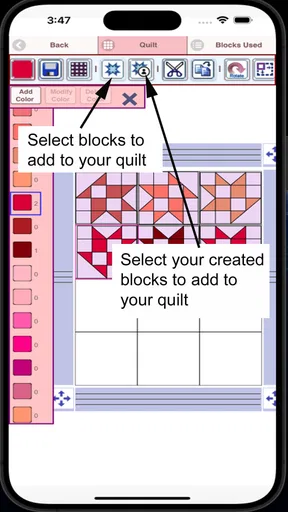
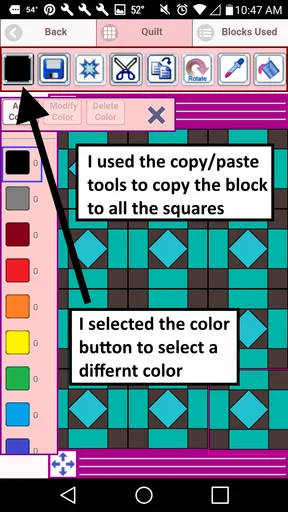
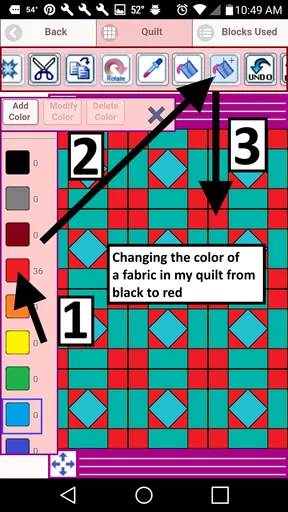
Quilt Creator is designed around customization, allowing users to explore different colors and arrange design elements into personalized quilt layouts. Depending on the version and device, the available tools may include selecting colors, editing blocks, changing arrangements, and previewing the finished pattern. Users should check the current app listing because specific features can vary between updates and platforms.
Can I save, export, or share quilt designs created in the app?
The ability to save and share designs is one of the most important features to check before downloading Quilt Creator. The app may allow users to keep projects for later editing or share finished layouts as images, but available export formats and sharing options can depend on the operating system and app version. It is also wise to confirm whether saving requires an account or a paid upgrade.
Is Quilt Creator free to download, and are there in-app purchases?
Quilt Creator may be available as a free download, but some features, design resources, advanced tools, or an ad-free experience could require in-app purchases. Before installing it, review the official Google Play Store or Apple App Store listing for the current pricing model. Also check subscription details, supported devices, and whether purchases are optional or necessary for the type of quilt planning you want to do.
